Redact Personal Data from PDFs and Text Files
Sooner or later a document has to leave the place it was written for: a contract goes to a partner, a support ticket to a contractor, a batch of claims into an LLM. Most of the time the recipient needs the content, not the names, phone numbers and bank details in it. Today we are launching Redact Personal Data: CloudConvert finds the personal data in your PDF and text files and removes it, in the converter and in the API.
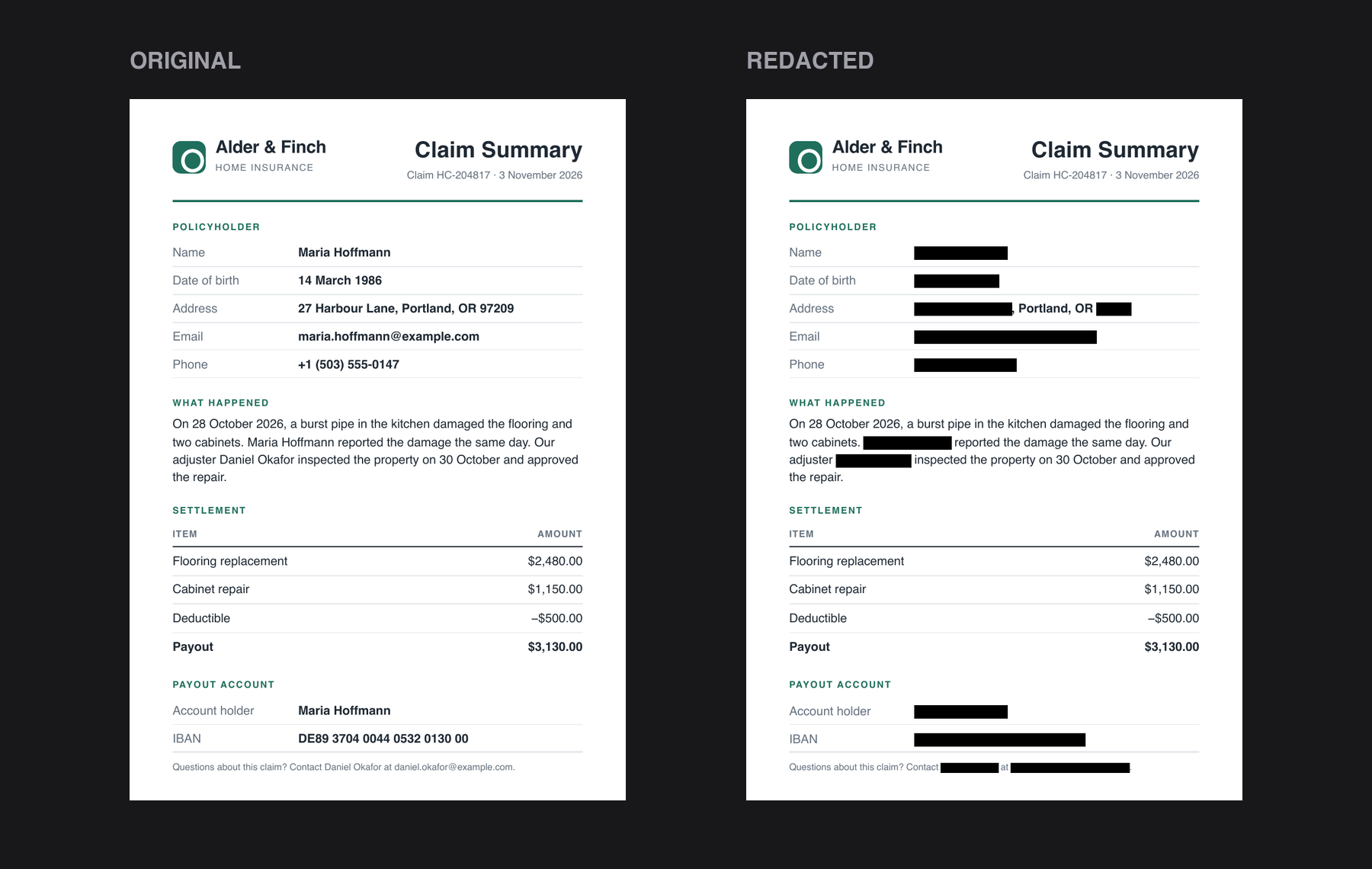
The document above is a sample we made for this post. The right side is what came back: twelve redactions, while the amounts, dates of the claim and everything else stayed in place.
What is found
An AI model reads the text of your file and marks what belongs to a person. By default that is:
- names
- contact data: email addresses, phone numbers, street addresses and postal codes
- dates of birth
- ID, passport, driver's license and tax numbers
- bank accounts, IBANs and card data
- credentials such as passwords, API keys and access tokens, and IP addresses
If you need more, the strict preset also removes cities, regions and countries, other dates, account IDs and URLs. If you need less, pick one group (names, contact, financial, identity or credentials) or list the types yourself. The model knows English, German, French, Spanish, Italian, Portuguese and Dutch.
Removed, not just covered
A black rectangle drawn over a PDF hides nothing: the text below it can still be selected, copied and searched. That is how redacted documents keep making the news.
CloudConvert removes the text from the document itself and puts a black box in its place. Form fields, annotations, comments, bookmarks and links are checked as well, and the metadata of the document (author, title and the like) is removed along the way.
Scanned pages have no text to check. Turn on OCR and CloudConvert reads the scan first, then redacts the recognized text together with the image under it.
TXT and Markdown files work too. There the personal data is replaced by its type, so Call Maria Hoffmann at +1 (503) 555-0147 becomes Call [PERSON] at [PHONE_NUMBER]. You can also have it masked or removed.
Built for compliance, and for LLMs
Sharing less personal data is the simplest way to meet your privacy obligations. Some places where redaction fits in:
- Before sending documents to others: customers, partners, authorities, or the public.
- Before sending documents to an LLM: redact a file, then convert it to Markdown and pass it on. With the type labels in text files, the model still knows that a name or a date stood there.
- Before keeping documents: test data, training material and archives rarely need the real names.
This supports data minimization under the GDPR and similar regulations.
The redaction itself runs on our own servers. Your files are not sent to a third party, and they are removed after processing as always.
In the API
Redaction is a task like any other: ai/redact between an import and an export task.
{
  "tasks": {
    "import-my-file": {
      "operation": "import/url",
      "url": "https://example.com/contract.pdf"
    },
    "redact-my-file": {
      "operation": "ai/redact",
      "input": "import-my-file",
      "preset": "standard",
      "ocr": true
    },
    "export-the-redacted-file": {
      "operation": "export/url",
      "input": "redact-my-file"
    }
  }
}
The result of the task tells you how many redactions of each type were made, without repeating what was removed. As it is a regular task, you can combine it with others in one job: redact a file, convert it, add a watermark. The documentation has all the options, and the Job Builder lets you try them out. If you work with an AI assistant, the CloudConvert MCP server can redact files as well.
Pricing
Redaction consumes credits like a conversion, by its processing time. You can try it without an account.
Check the result
AI models make mistakes. Some personal data may be missed, and some text that is no personal data may be removed. Have a look at the result where it matters, and please let us know where it falls short.